 Skip to content
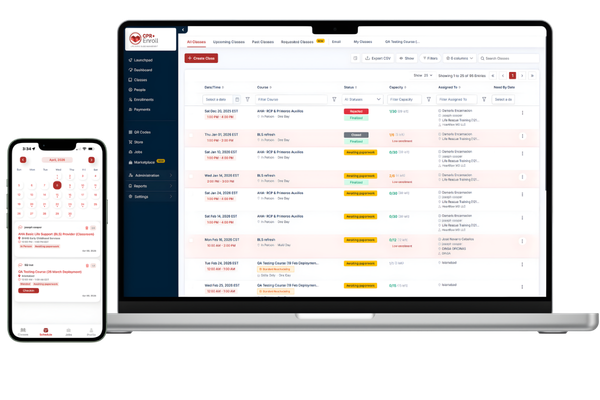
Schedule Every Kind of CPR Class Without Fighting Your Calendar
Create scheduled, private, corporate, flexible, virtual, online, multi-day, kiosk, and instructor-less training from one connected system built for real CPR operations.
- Unlimited instructors
- Unlimited locations
- One connected calendar
Your Calendar Should Not Need a Translator
A CPR class is not just a date and time. It can involve multiple sessions, blended learning, instructor availability, assistant instructors, equipment, client restrictions, location rules, capacity, prerequisites, and a student who wants a different time after registering.
Too Many
Class Formats
Public classes, private clients, skills sessions, virtual instruction, recurring programs, and kiosk appointments should not require separate scheduling tools.
Too Many
Moving People
Lead instructors, assistants, coordinators, students, and clients all need the right schedule without receiving everyone else’s information.
Too Many
Calendars
When the website calendar, staff calendar, spreadsheet, and phone calendar disagree, the spreadsheet usually wins. Nobody knows why.
Too Much Manual Coordination
Availability, class changes, cancelations, meeting links, and reminders should not require a personal email chain every time.
CPR Enroll connects the class, the course, the instructor, the location, the student, and the schedule in one workflow.
Teach the Way Your Business
Actually Operates
Build each course around the training experience you deliver, then publish classes with the schedule, location, instructor,
capacity, pricing, and enrollment rules that apply.

Scheduled Classes
Publish a class with fixed dates and times for community, workplace, private, and open-enrollment training.

Private and
Corporate Classes
Limit visibility to the right client, employee group, or registration audience while keeping the class inside your main operation.

Multi-Day and Multi-Session
Build programs that meet across multiple dates or include more than one session without creating disconnected records.

Recurring Classes
Create repeat schedules for programs that run on a predictable cadence and keep the class calendar organized.

Flexible
Appointments
Offer time blocks and let students select a suitable slot for skills checks, one-on-one training, or appointment-based sessions.

Virtual Instructor-Led
Use a static meeting link or supported Google Meet and Zoom workflows for remote instruction.

Online and eLearning
Deliver self-paced learning and eLearning packages while keeping the student and course record connected.

Kiosk and
Instructor-Less
Manage skills stations, pods, and self-directed training at one or multiple locations.
Turn Course Settings Into Repeatable
Class Workflows
A course can carry the registration rules, pricing options, credentials, communications, paperwork, add-ons, and scheduling behavior you want applied to future classes. Create the course once, then use it as the operational starting point every time you schedule.
Build or Select the Course
Choose a marketplace template or configure your own course details, identification, pricing, enrollment rules, credentials, media, and communication settings.
Create the Class
Choose the class format, dates, sessions, instructor, assistant instructor, location, capacity, and any class-specific adjustments.
Publish and Share
Publish the class to the appropriate audience and share a direct registration link, category page, QR code, client portal, or public listing.
Let Students Choose a Time Without
Handing Them Your Calendar
Flexible classes let you publish availability instead of forcing every student into one fixed session. Students can choose an eligible time, location,
or instructor while CPR Enroll applies the availability and scheduling rules behind the scenes.
Any Available Instructor
Show time slots based on available resources and allow the system to assign an eligible instructor.
Instructor or Location Choice
Show time slots based on available resources and allow the system to assign an eligible instructor.
Visible Scheduling Conflicts
Use blocked and available calendar views to understand why a slot cannot be booked before promising it to someone.
Availability Manager
View eligible instructors, locations, and open booking times.
You can stop replying, “Let me check three calendars and get back to you.”
Keep the Right Instructor in the
Right Place at the Right Time
Assign lead instructors, assistants, and locations while keeping schedule information connected to the class. Personal calendar
preferences and saved class views help each user focus on the work that matters to them.
Instructor
Assignments
Assign instructors and assistants to classes, update assignments, and give appropriate users visibility into the sessions they support.
Physical and Virtual Locations
Manage physical sites and virtual locations, including supported meeting-link creation and class-specific location details.
Calendar
Synchronization
Keep supported Google Calendar events aligned for assigned instructors and assistants as classes are created or updated.
Assign the right instructor
Review instructor availability and assign a qualified instructor to the class.
Create a physical or virtual location
Choose how students will attend and configure the appropriate location details.
Physical Location
Use an address for classroom and in-person training.
- Address and contact details
- Map and directions
- Room and capacity settings
Virtual Location
Add a meeting link for live online and virtual classes.
- No physical address required
- Virtual meeting link
- Online attendance instructions
Keep availability synchronized
Connect Google Calendar to coordinate classes, availability, and scheduling changes.
- Account
- demo@cprenroll.com
- Calendar
- CPR Enroll Classes
- Last Sync
- Today at 9:41 AM
Synchronization Status
Switch between list, board, and calendar views
Save frequently used filters and quickly find the classes that need attention.
Use list, board, or calendar views, save frequently used filters as tabs, and return to the view that fits the way you work.
Support More Than the Traditional Classroom
Expand access without building a separate system for every delivery model.
Instructor-Led Session
Virtual Instructor-Led
Create virtual locations with a static link or supported Google Meet and Zoom options. Meeting information can be included in student communications and updated as the class changes.
eLearning Delivery
Online and eLearning
Deliver self-paced or packaged eLearning content with a course setup designed for online completion rather than an in-person timetable.
Kiosk Skills Station
Kiosk and Instructor-Less
Offer students available locations and booking options for skills stations or self-directed sessions, including location-specific configuration where enabled.
Generic Appointment Software
Stops at the Booking
A CPR class is not a thirty-minute appointment with one provider. It may include an online prerequisite, one or more in-person sessions, a lead instructor,
an assistant, a physical or virtual location, equipment requirements, a client roster, capacity limits, class paperwork, certification
details, and several communications before the student arrives.
A CPR class is not a thirty-minute appointment with one provider. It may include an online prerequisite, one or more in-person sessions, a lead instructor, an assistant,
a physical or virtual location, equipment requirements, a client roster, capacity limits, class paperwork, certification details, and several
communications before the student arrives.
July 22 BLS Provider Class
Complete class information, enrollment status, sessions, instructor assignment, and documentation.
Sessions
Enrollment
Class Context
See the course, schedule, sessions, instructor assignments, location, capacity, visibility, enrollment activity, and related records together.
Operational Continuity
Information entered during course and class setup can continue into registration, confirmations, rosters, paperwork, completion, and renewal workflows.
Controlled Visibility
Publish classes publicly, keep them private, share them with a corporate client, or present only the schedules that apply to a specific audience.
Scalable Scheduling
A solo instructor can start with a simple calendar. A growing training center can add assistants, locations, recurring programs, virtual options, and more complex availability.
One Scheduling System for Several
Training Models
Most training businesses do not operate with one class type forever. CPR Enroll lets the organization configure each model without sending
staff and students into unrelated systems.
Open-Enrollment Community Classes
Publish fixed-date classes for the public, set capacity and registration rules, assign the instructor and location, and share the live registration path across your website, Class Finder, email, social media, or QR code.
BLS Provider
Private and Corporate Training
Create training visible only to the intended client or employee group while keeping the schedule, roster, invoice activity, paperwork, and training history connected.
Class Visibility
Control who can discover and register for this class.
Blended-Learning Skills Sessions
Publish fixed-date classes for the public, set capacity and registration rules, assign the instructor and location, and share the live registration path across your website, Class Finder, email, social media, or QR code.
Choose a Time
Flexible One-on-One Appointments
Publish eligible availability and let students choose controlled times, locations, or instructors for skills checks, make-up sessions, and small groups.
eLearning Package
Multi-Location and Kiosk Programs
Offer multiple training locations under a coordinated program and apply location-specific availability or pricing where configured.
Select Provider
Choose an available instructor and meeting platform for your virtual class.
Controlled Visibility
Create virtual instructor-led classes with supported meeting workflows or deliver self-paced eLearning packages without treating online training as a physical appointment.
eLearning Package
Complete your online course modules before attending the hands-on skills session.
Fewer Hand-Offs. Fewer Surprises.
Better Use of Staff Time
The value of scheduling software is not the number of calendar colors it offers. The value is how much repetitive coordination disappears
once the class schedule is connected to the rest of the business.
- Before: Fragmented Work
Your Clipboards Have Had a
Good Run
Separate Publishing and Calendar Updates
A staff member creates the class in one system, copies it to the website, adds it to a personal calendar, and emails the instructor.
Manual Change Communication
A timing or location change starts a chain of messages to students, instructors, assistants, clients, and administrators.
Rebuilding After Completion
Staff export a roster, locate paperwork, find payment details, and create certification or renewal records elsewhere.
- After: Connected Workflow
Get Paid Without Becoming the Accounting Department
One Class Record
The class is created once, published through the configured path, assigned to the right people and location, and managed from one record.
Connected Updates
Supported notifications and calendar workflows help keep affected people informed from the same operational source.
Continuous Lifecycle
Enrollment, paperwork, attendance, certification, reporting, and renewal activity continue from the same class record.
Useful for a Solo Instructor. Ready for a
Growing Organization.
Independent Instructors
Create public classes, flexible appointments, and private sessions without maintaining separate scheduling, registration, payment, and reminder tools.
Training Centers
Coordinate instructors, assistants, courses, rooms, class formats, waitlists, and schedule changes from a shared operational calendar.
Multi-Location Providers
Manage classes across branches, partner sites, skills stations, and mobile training locations with relevant staff views and permissions.
Corporate Training Teams
Schedule private employee classes, preserve client-specific visibility, manage group rosters, and retain training history for future planning.
Flexible and Kiosk Operators
Publish appointment-style availability, multiple locations, and self-directed options while maintaining connected records.
CPR Enroll does not require every customer to use every scheduling model. Begin with the class formats you use today and add
more operational depth as the business expands.
Reusable course settings ready for class creation.
Course card
Create or select the course that defines training, enrollment, communication, and record requirements.
Classroom session ready for instructor assignment.
Create Class
Choose the class format, dates, sessions, location, instructor, capacity, and availability rules.
Downtown Center · 10:00 AM
Share Registration
Publish the class to the correct audience and share the registration path.
10:00 AM · Downtown Center
Class details or waitlist
Manage enrollments, waitlists, changes, cancelations, and instructor assignments from the class record.
Completed July 30, 2026
Completed class record
Manage enrollments, waitlists, changes, cancelations, and instructor assignments from the class record.
From Course Setup to a Full Class Calendar
cheduling Is the Beginning,
Not the Whole Workflow
Registration & Payments
Turn the published class into a mobile registration, payment, confirmation, and rescheduling experience.
Paperwork & Compliance
Generate the class documents, checklists, signatures, and records required afterenrollment.
Certifications & Renewals
Store completion details, manage credential information, and create the next renewal opportunity.
Everything You Need to Know
About CPR Enroll
CPR Enroll connects what happens before, during, and after every class—from the moment a student finds you through registration, payment,
attendance, paperwork, certification, renewal, and repeat enrollment.
Find clear answers before starting your free trial.
Learn how CPR Enroll supports CPR instructors, training organizations, students, payments, documentation, and certification workflows.
- Class and enrollment management
- Payments and digital paperwork
- Certifications and renewals
CPR Enroll supports public, private, corporate, scheduled, flexible, virtual, online, blended-learning, multi-day, recurring, kiosk, and instructor-less workflows, depending on your organization’s setup.
Yes. Organizations can publish or prepare classes before the instructor assignment is final, then assign the appropriate instructor later.
Yes. Flexible scheduling can present eligible time slots based on the availability and configuration defined by the organization
Yes. CPR Enroll supports multiple instructors, assistants, staff users, physical locations, virtual locations, and organization-level scheduling workflows.
Virtual locations can use a static meeting URL or supported Google Meet and Zoom integrations. Available behavior depends on the connection and class configuration.
Supported calendar synchronization can include assigned assistant instructors so class changes remain visible without manual calendar entry.
Yes. Waitlist actions are available from class-management workflows so staff can review demand and respond when availability changes.
Yes. CPR Enroll supports kiosk and instructor-less scheduling models, including multiple locations and configuration options designed for appointment-based training.
Yes. CPR Enroll supports recurring schedules and classes that include multiple dates or sessions, allowing the full program to remain connected instead of creating unrelated one-day records.
Yes. Classes can be configured for private or client-specific registration paths so the intended group can enroll without placing the class in the general public listing.
Staff can update the class record and use the configured communication and calendar workflows to keep affected students and assigned personnel informed. The exact notifications depend on the organization’s settings.
Yes. Users can work from list, board, or calendar views and save frequently used filters as tabs where that functionality is enabled, helping each person return to the classes most relevant to the role.
Your Next Class Should Not Create
Three Hours of Admin Work
Build the course, publish the class, coordinate the people and locations, and keep the entire schedule connected
in one platform built for CPR training businesses.
Card required. No charge during your trial. Your selected plan begins automatically after 14 days unless you cancel.
